omlx in the agent panel
oMLX serves the models on your Mac to termide's agent, which takes each model's window from it, shows its prefill and switches between its models in a session
oMLX runs models on Apple Silicon with MLX, from a menu-bar app: several models from one server, loaded as they are asked for, and a prompt cache that spills from memory to the SSD and survives a restart. It speaks the OpenAI chat API, and termide’s agent panel can run on it.
As with llama.cpp, the server brings no agent of its own: termide runs the agent — its system prompt, tools, permission checks and compaction — and oMLX answers the model calls. This guide covers what is particular to oMLX; the llama.cpp guide covers what any local server shares.
What you need
- A Mac with Apple Silicon and macOS 15 or later.
- oMLX: the app from its releases, or Homebrew (
brew tap jundot/omlx https://github.com/jundot/omlxandbrew install jundot/omlx/omlx, thenomlx start). The server listens on port 8000. - A model that calls tools, downloaded from the admin dashboard (
http://localhost:8000/admin) or put in its model directory (~/.omlx/models): Qwen, GLM, Gemma and the like. An agent works only through tool calls.
Add the connection
Open the settings with Alt+P and go to AI. Connections comes first. + Add connection adds an OpenAI-compatible one; on its page:
- Base URL:
http://127.0.0.1:8000/v1. - Model: termide asks oMLX for its models, and it lists every one in its model directory, loaded or not.
- Context window (fallback): leave it empty. oMLX reports each model’s window, and the panel takes it at startup and on every switch of model, so
Context:matches what the server allows. - Requests at once: leave it at no limit. oMLX batches requests itself, eight at once by default; set it only to keep termide below a lower
--max-concurrent-requests. - API key: oMLX’s main API key, unless you turned its verification off for localhost. The key goes into termide’s encrypted vault, not into
config.toml. - Use by default: tick it, and new agent panels start on oMLX.
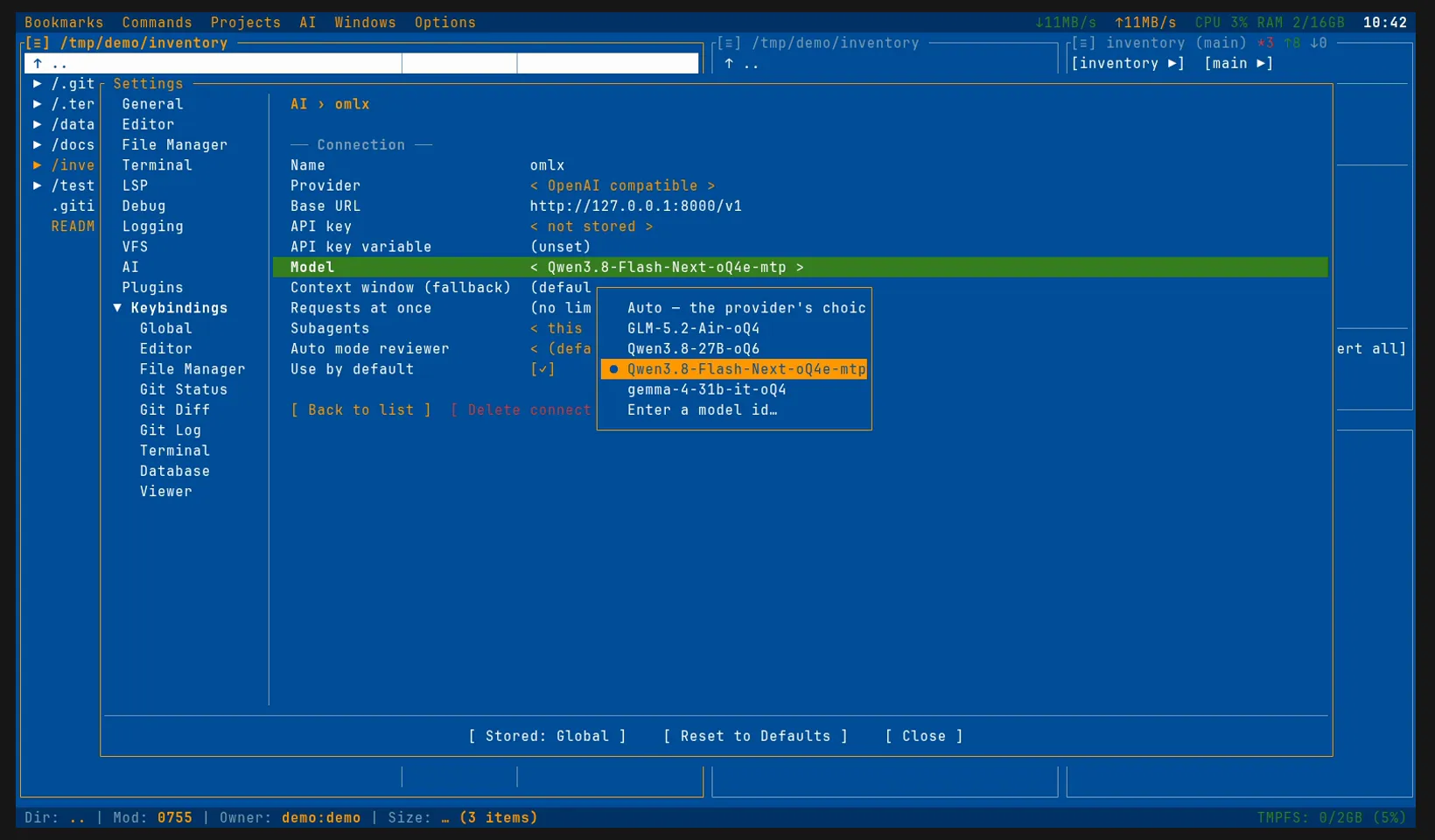
The same in config.toml:
[ai]
connection = "omlx"                  # the connection new sessions start on

[ai.connections.omlx]
provider = "openai_compatible"
base_url = "http://127.0.0.1:8000/v1"
model = "Qwen3.8-Flash-Next-oQ4e-mtp" # empty: the first model listed
# api_key_env = "OMLX_API_KEY"       # a variable holding its main API key
oMLX also serves the Anthropic Messages API, but the OpenAI-compatible connection is the one to take: termide reads the models’ windows and the prefill progress there.
The first request
Open the agent panel with Alt+A. Until the first token, the panel shows the prefill: oMLX 0.7.1 and later report their prompt-processing progress as llama.cpp does, so the panel draws a bar with the tokens read so far and the speed over those not served from the cache. An older oMLX gets the elapsed time and an estimate of the prompt’s size instead.
The Reasoning chip switches the model’s thinking on and off as the chat template’s enable_thinking, and within one request termide sends the model’s reasoning back with each step, as on any local server.
Several models, one server
The Model chip in the status bar lists the server’s models and switches the session between them; the switch takes effect from the next request and stays with the session. oMLX loads a model the first time it is asked for, so that request takes the load time as well, and evicts the least recently used when memory runs low; pin the models you use every day in its dashboard to keep them loaded.
Two more things of oMLX’s show in the list:
- Aliases. A model given an alias in the dashboard is listed by it.
- Profiles. A profile exposed as a model is listed as
<model>:<profile>,qwen3-8b:thinkingsay: the same loaded model with the profile’s settings, chosen per session from the chip.
oMLX keeps the prompt cache in memory and, past that, on the SSD, even across a restart of the server. Reopening a long session therefore reads most of its prompt from the cache rather than processing it again: the status bar shows that as a large ↻ beside a small ↑.
A small model for the reviews
In auto mode a reviewer decides what would otherwise put a permission card up: one more request before each such action. By default it runs on the session’s own model. With oMLX a smaller model of the same server can take it, with no second server to run:
[ai.auto_reviewer]
connection = "omlx"   # empty: the session's own
model = "gemma"       # a model of it, by id or a part of one
The reviewer’s model stays loaded beside the session’s, so leave room for both in memory.
The rest is termide’s
Everything else works as on any local server, and the llama.cpp guide goes through it: termide’s own system prompt and tools, the context it compacts near the window, the permission modes, what the panel does when the server is down or the context is full, and how session info counts the tokens.
Good to know
- The server can be another Mac. oMLX refuses to listen beyond the loopback without a main API key: set one, start it with
--host 0.0.0.0, and point Base URL at that Mac. - oMLX is one example. The same OpenAI-compatible connection reaches llama.cpp, vLLM, Ollama, LM Studio or a hosted API such as OpenAI or OpenRouter, and
provider = "anthropic_compatible"an Anthropic-compatible one. - termide is no sandbox. Its permissions are a control, not isolation: what you allow runs with your rights.
- The other connections: Claude Code, Codex and Gemini CLI bring their own agents and subscriptions; an oMLX connection makes a good second one to move a session to when their limit runs out.
- The details are in the agent guide.