llama.cpp in the agent panel
A model on your own machine drives termide's agent through llama-server, with a live prefill bar, a context termide keeps within the window, and slots it shares out
llama.cpp runs a model on your own hardware: no subscription, no quota, and nothing you send leaves the machine. Its llama-server speaks the OpenAI chat API, and termide’s agent panel can run on it.
Unlike Claude Code, Codex or Gemini CLI, a model server brings no agent of its own. termide runs the agent itself: its system prompt, its tools, its permission checks and its compaction, with llama-server only answering the model calls. This guide sets that up and shows what termide does for a local model in particular.
What you need
- llama-server, from a llama.cpp build or a package (
brew install llama.cpp, for one). - A model that calls tools, as a GGUF file: Qwen, GLM, gpt-oss and the like. An agent reads, edits and runs commands only through tool calls, so a model without them cannot work in the panel.
Start the server with the window you want and a short name for the model:
llama-server -m ~/models/Qwen3.6-35B-A3B-Q4_K_M.gguf \
--alias qwen3.6-35b-a3b -c 65536 --port 8080-cis the context window. Leave it out and llama-server takes the model’s own, which may not fit in memory; termide needs the number either way (see below).--aliasnames the model in the API. Without it the model’s id is the path to its file.--jinja, on by default in current builds, renders the model’s own chat template, which is what makes its tool calls work.
Add the connection
Open the settings with Alt+P and go to AI. Connections comes first. + Add connection adds an OpenAI-compatible one, which is what llama-server is; on its page:
- Base URL:
http://127.0.0.1:8080/v1. - Model: termide asks the server for its models; llama-server lists the one it loaded.
- Context window (fallback): the
-cyou started the server with. llama-server does not report its window to termide, so without it the panel assumes 32,000 tokens: it compacts too early on a bigger window, and the server refuses a request past a smaller one. - Requests at once: how many requests llama-server runs at a time (see Slots).
- API key: only if you started the server with
--api-key. The key goes into termide’s encrypted vault, not intoconfig.toml. - Use by default: tick it, and new agent panels start on llama.cpp.
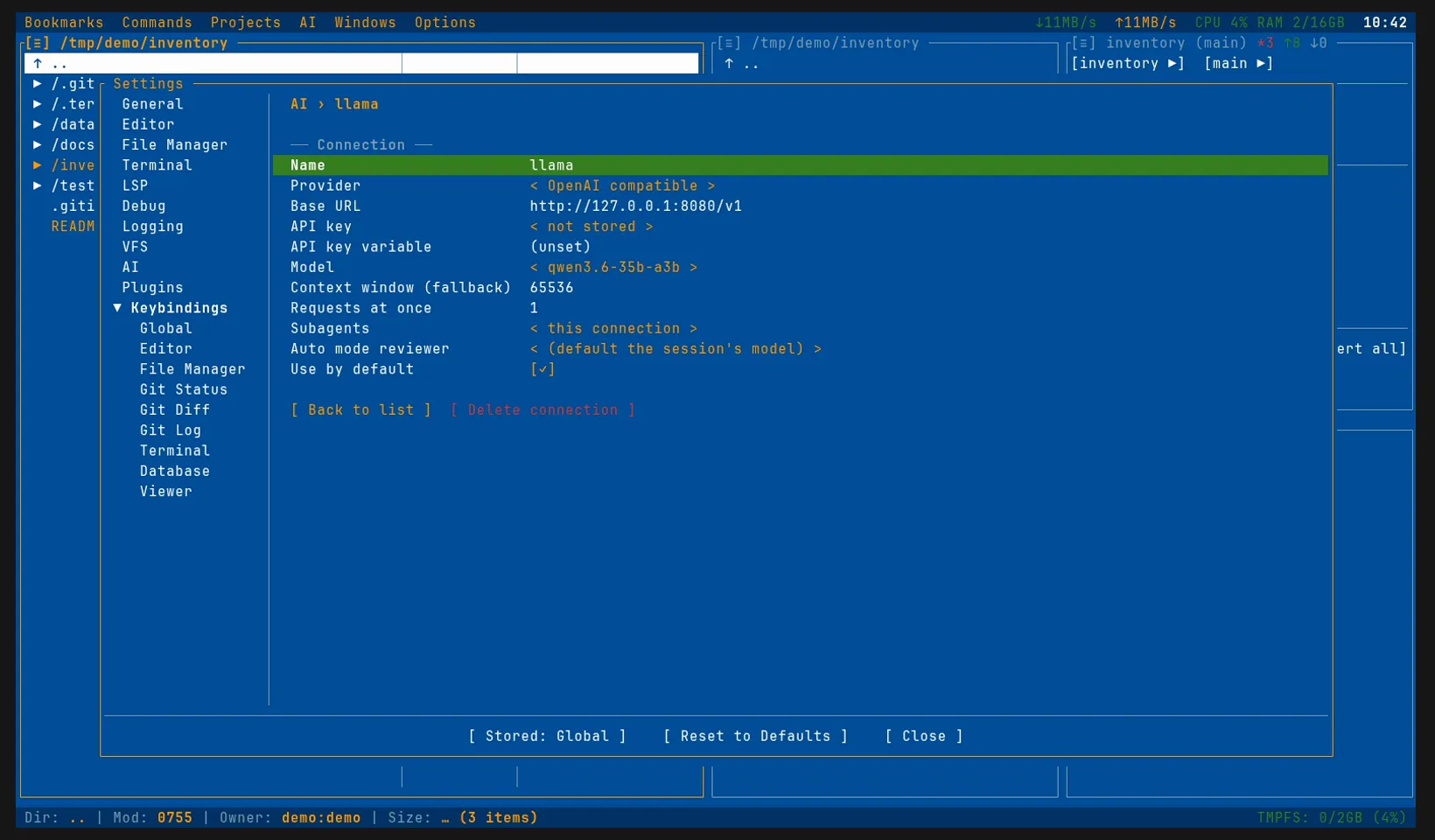
The same in config.toml:
[ai]
connection = "llama"                 # the connection new sessions start on

[ai.connections.llama]
provider = "openai_compatible"
base_url = "http://127.0.0.1:8080/v1"
model = "qwen3.6-35b-a3b"            # the --alias; empty: the first model listed
context_window_fallback = 65536      # the -c of llama-server
max_concurrent_requests = 1          # its slots
# api_key_env = "LLAMA_API_KEY"      # a variable holding its --api-key
The first request
Open the agent panel with Alt+A. Until the model’s first token arrives, the panel shows how far llama-server has read the prompt: termide asks for its prompt-processing progress, and llama-server reports it as it goes.
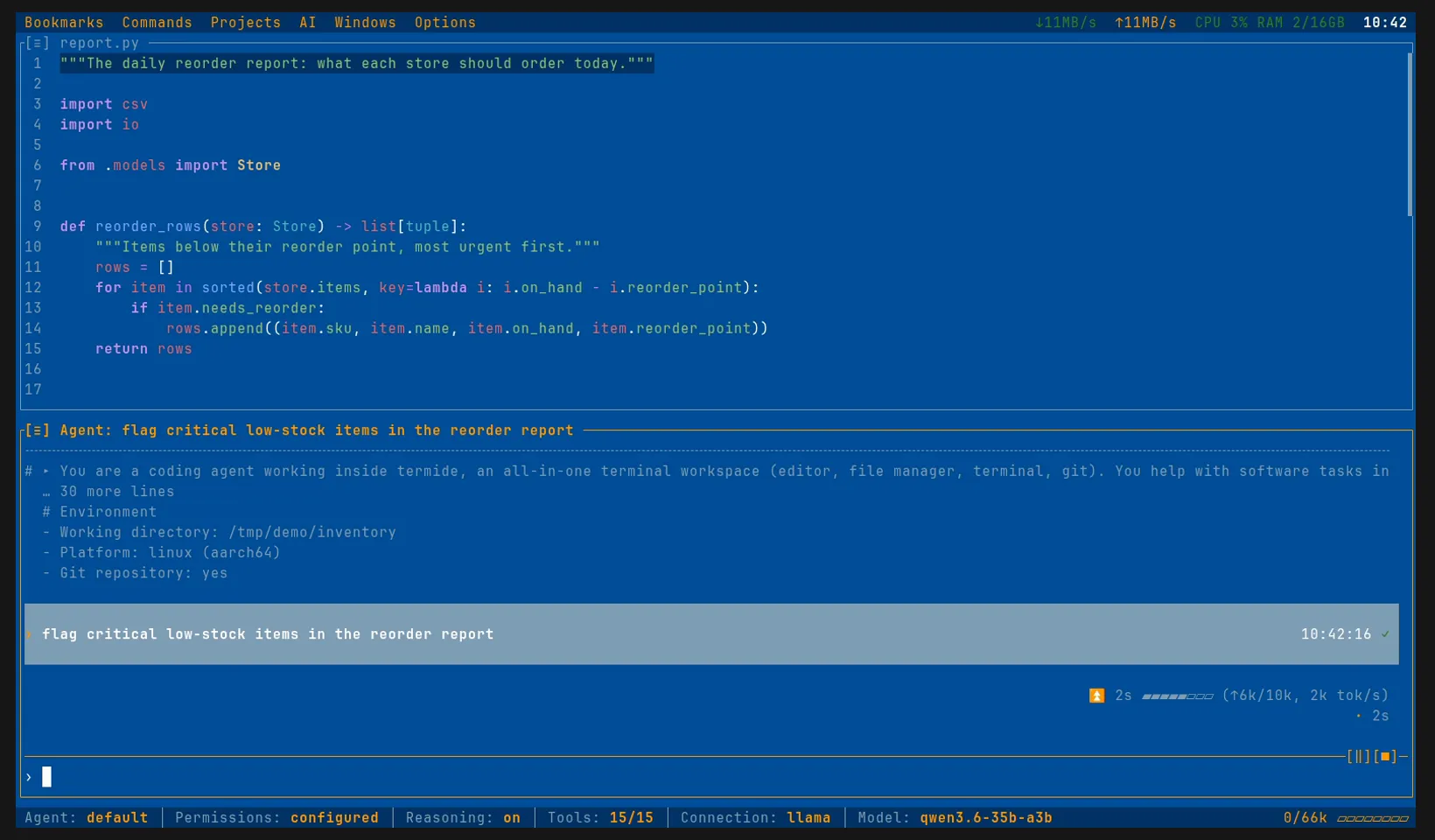
On a local model the prefill is often the slow part: the system prompt and the tool schemas alone run to several thousand tokens, and a long session to tens of thousands. llama-server keeps what it has read in its cache, so the next request of the conversation reads only what was added since, and the bar shows that: ↑360 rather than ↑10k. The finished block keeps the prefill and the generation figures: how long each took, how many tokens and how fast.
The Reasoning chip switches the model’s thinking on and off: termide sends it as the chat template’s enable_thinking, which the Qwen, GLM and DeepSeek templates read. Off, the model answers sooner and spends fewer tokens; on, it plans first, which a multi-step task usually needs. Within one request termide sends the model’s reasoning back with each step, so it does not lose its own plan between a read and an edit.
A message typed while the agent works joins the run at its next step, and /pause stops it between steps.
termide’s agent, your model
Everything the agent does is termide’s: the system prompt (which reads your AGENTS.md), the tools — read, edit, shell, terminal sessions, the web, recall — the MCP servers you configured, your skills and the permission rules. The model only chooses what to call. A smaller model makes more mistakes at that than a frontier one, so permission cards and /undo count for more here.
The context is termide’s to keep within the window too. Near the window, at the window minus reserve_tokens, termide has the model summarise the older part of the session, keeping the recent messages as they are; /compact does it on request:
[ai.compaction]
enabled = true              # compact automatically near the window
reserve_tokens = 16384      # start when the context passes the window minus this
keep_recent_tokens = 4096   # recent messages kept verbatim
read hands the agent a picture as an image, so a screenshot needs a vision model with its projector (--mmproj, or brought along by -hf); the server of a text-only model refuses the request.
Slots
llama-server runs as many requests at once as it has slots (--parallel). A panel is not the only thing that calls the model: delegated tasks, the auto reviewer, a session’s title and the other panels do too. A request beyond the slots either waits on the server or takes over a slot whose cache another conversation needed, so that conversation reads its whole prompt again.
Requests at once (max_concurrent_requests) keeps that in hand: set it to the slots, and termide queues the rest itself, first come first served. A queued request shows ⏳ with how long it has waited and how many wait before it, and Esc stops it before it is sent.
With --parallel the slots share the -c window: each gets -c divided by the slots unless the server runs a unified cache (--kv-unified). The Context window (fallback) is what one request can use, so set it to one slot’s share.
Permissions and auto mode
The Permissions chip (or Shift+Tab) works as on any connection: ask, configured, plan, edit, all and auto, with termide deciding each call itself, as there is no agent of the server’s to map them onto.
In auto the reviewer runs on the session’s own model by default: one more request before each action it decides, through the same slots. Reads, edits inside the project and look-only commands never reach it. A small, fast model is the usual choice: run it as a second llama-server and name its connection as this connection’s reviewer:
[ai.connections.llama]
# …
reviewer = "llama-small"             # its auto reviewer; default: [ai.auto_reviewer]

[ai.connections.llama-small]
provider = "openai_compatible"
base_url = "http://127.0.0.1:8081/v1"
context_window_fallback = 16384
max_concurrent_requests = 1
When something fails
- The server is down or restarting: the run ends with Cannot reach the model, and the card offers Try again now, Keep trying until it goes through and Stop. For an unattended
/goalor/loop, set On a limit or outage (on_limitunder[ai]) towait. - The context is full: llama-server refuses a prompt past its window, and termide compacts the session and tries once more by itself. If that fails too, the card offers Compact the context and try again. A refusal like that usually means the Context window (fallback) is set above what the server runs.
Sessions and spending
Nothing is billed, but tokens still cost time. Session info (F3 or /usage) breaks them down by who spent them — the conversation, subagents, the auto reviewer, summaries — and the status bar counts the session’s input, cache reads and output (↑11k ↻30k ↓460) beside the context and its window (11k/66k). A high ↻ against ↑ is llama-server’s cache at work.
Good to know
- The server can be elsewhere. llama-server on a rented machine works the same: start it with
--host 0.0.0.0and--api-key, and point Base URL there. termide sends the reasoning switch, the progress request and the reasoning echo to any server but the hosted APIs, whatever its address, and leaves out a field that a server refuses. - termide is no sandbox. Its permissions are a control, not isolation: what you allow runs with your rights.
- llama.cpp is one example. The same OpenAI-compatible connection reaches vLLM, Ollama, LM Studio or a hosted API such as OpenAI or OpenRouter, and
provider = "anthropic_compatible"an Anthropic-compatible one. omlx is another local example, for a Mac. - The other connections: Claude Code, Codex and Gemini CLI bring their own agents and subscriptions; a llama.cpp connection makes a good second one to move a session to when their limit runs out.
- The details are in the agent guide.