OpenRouter in the agent panel
One key to the models of every major lab drives termide's agent, with the model's window, prompt caching and a cheaper model for the side work
OpenRouter puts hundreds of models behind one API: Anthropic’s, OpenAI’s, Google’s, DeepSeek’s, Qwen’s, Moonshot’s and more. You get one key and one balance of prepaid credits, and you pay per token for whichever model you call. Its API is OpenAI’s chat API, so termide’s agent panel runs on it as an ordinary OpenAI-compatible connection.
As with a local server, the agent is termide’s own: its system prompt, its tools, its permission checks and its compaction, with OpenRouter only answering the model calls. What OpenRouter adds is the choice: switch the model in the middle of a session, and give the side work to a cheaper one. This guide sets that up and shows what termide does for OpenRouter in particular.
What you need
- An OpenRouter account with credits. Models whose id ends in
:freecost nothing but allow only a few requests a minute and a day, which an agent uses up quickly: every step of a task is a request. - An API key, made on the Keys page of your account (
sk-or-v1-…). A key can carry a credit limit of its own, which caps what termide can spend with it.
Add the connection
Open the settings with Alt+P and go to AI. Connections comes first. + Add connection adds an OpenAI-compatible one; on its page:
- Name:
openrouter, say. The name is how you switch to the connection later. - Base URL:
https://openrouter.ai/api/v1. - API key: Enter a key… stores it in termide’s encrypted vault, not in
config.toml. Or put the key in an environment variable and name the variable in API key variable,OPENROUTER_API_KEYfor one. - Identify as Termide: appears as soon as the base URL points at OpenRouter (see below).
- Model: pick one (see The model).
- Context window (fallback): leave it empty. OpenRouter reports each model’s window, and termide takes it from there.
- Use by default: tick it, and new agent panels start on OpenRouter.
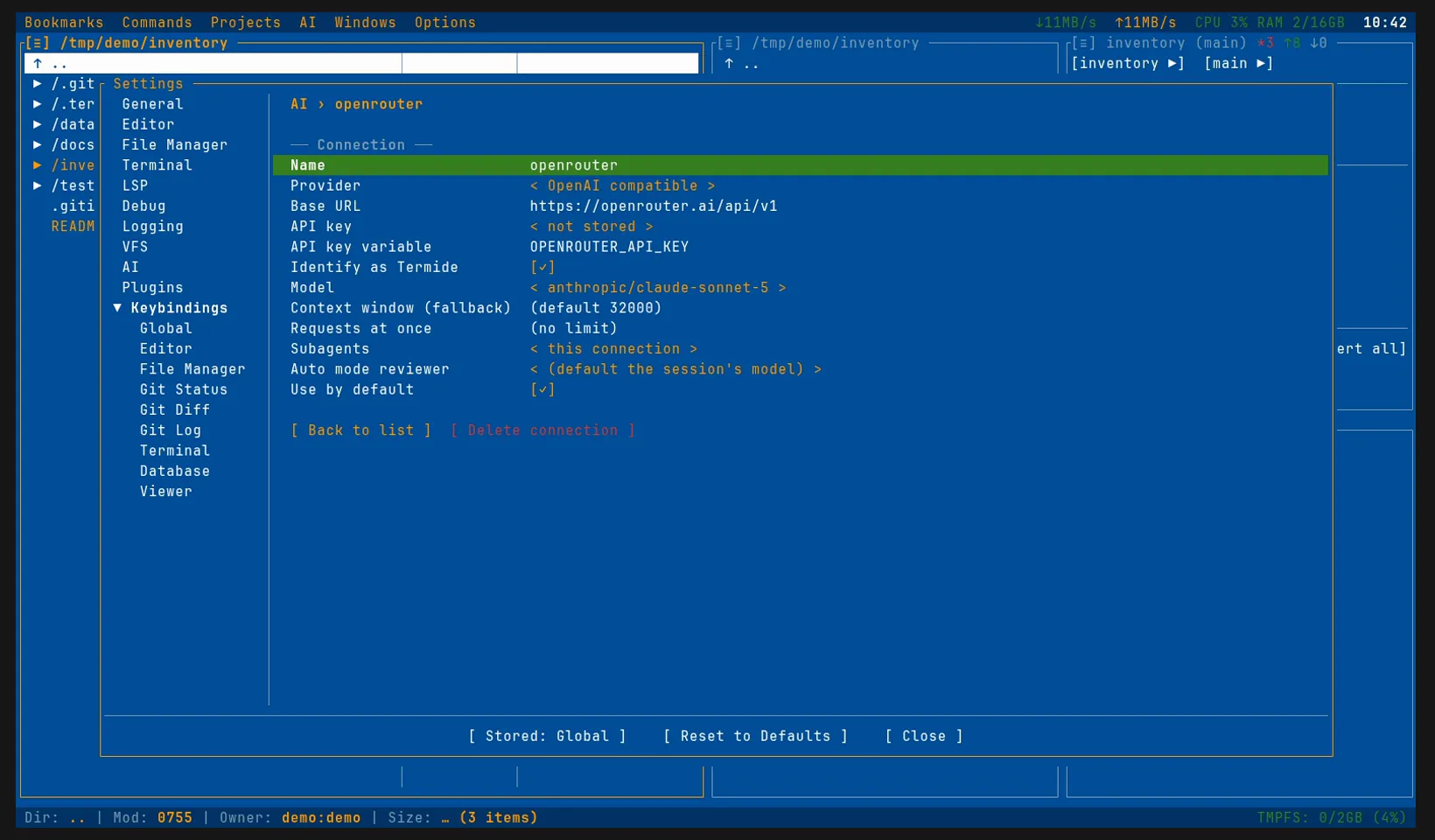
The same in config.toml:
[ai]
connection = "openrouter"            # the connection new sessions start on

[ai.connections.openrouter]
provider = "openai_compatible"
base_url = "https://openrouter.ai/api/v1"
model = "anthropic/claude-sonnet-5"
api_key_env = "OPENROUTER_API_KEY"   # or leave it out and keep the key in the vault
# app_attribution = false            # not to name termide to OpenRouter
The model
The Model dropdown lists OpenRouter’s models by the names OpenRouter gives them, Anthropic: Claude Sonnet 5 for anthropic/claude-sonnet-5, and stores the id. The list is long: Enter a model id… at its end takes an id typed by hand, copied from a model’s page on openrouter.ai/models, a :free variant or an alias such as ~anthropic/claude-sonnet-latest among them.
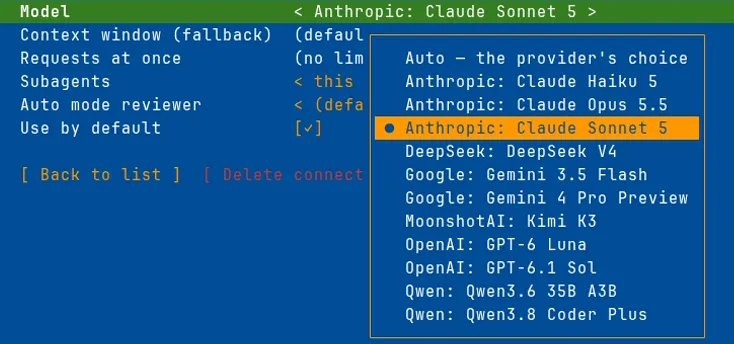
Pick a model rather than leave Auto. Auto runs on the first model the endpoint lists, which on a local server is the one it loaded, and on OpenRouter is simply the first id in alphabetical order.
The model must call tools: the agent reads, edits and runs commands only through tool calls. OpenRouter’s catalogue filters its models by the parameters they support, tools among them, and most current models take them.
Each model’s window comes with the list: when the session starts or switches model, termide takes the window OpenRouter reports for it, a million tokens for one model, 200,000 for the next, and keeps the context within it. The status bar shows the context against that window (11k/1M).
The first request
Open the agent panel with Alt+A and give it a task. The status bar names the connection and the model, and the Reasoning chip sets how hard the model thinks: termide sends the level as reasoning_effort, which OpenRouter passes on in whatever form the model’s provider takes. OpenAI’s models offer their own set of levels, the others low, medium and high.
The Model chip in the status bar switches the model for the session: the conversation carries on, and the next request goes to the new model with the new model’s window. A hard step can go to a stronger model, and the session can come back afterwards.
Prompt caching
An agent sends the whole conversation with every step: the system prompt, the tool schemas and everything said and read so far. A provider that caches the prompt reads that from its cache at a fraction of the input price; one that does not bills all of it again at every step.
OpenAI, DeepSeek, Gemini, Moonshot and most others cache by themselves. Anthropic’s models cache only when asked, and termide asks: on an OpenRouter connection, a request to an anthropic/… model carries cache_control, which caches the conversation up to its last message and moves along as it grows. The ↻ figure in the status bar is what came from the cache, ↻30k against ↑11k read anew in the recording above.
Spending
termide counts tokens, not money: Session info (F3 or /usage) breaks them down by who spent them — the conversation, subagents, the auto reviewer, summaries — and by model. What they cost is on OpenRouter’s Activity page, request by request.
Two things keep the bill down. Compaction keeps the context within the window, and well before it gets there you can /compact a long session yourself. And the side work can go to a cheaper model: a second connection to OpenRouter with a small model, named as this one’s reviewer for auto mode and as the connection its delegated tasks run on:
[ai.connections.openrouter]
# …
reviewer = "openrouter-small"        # the auto reviewer; default: [ai.auto_reviewer]
subagents = "openrouter-small"       # delegated tasks; default: this connection

[ai.connections.openrouter-small]
provider = "openai_compatible"
base_url = "https://openrouter.ai/api/v1"
model = "anthropic/claude-haiku-5"
api_key_env = "OPENROUTER_API_KEY"
The reviewer judges each action of auto mode that the rules leave open; reads, edits inside the project and look-only commands never reach it. Permissions (or Shift+Tab) switches between ask, configured, plan, edit, all and auto as on any connection.
Identify as Termide
OpenRouter keeps a breakdown of usage by the app that sent it, and files a request that names no app under Unknown. Identify as Termide (app_attribution), on by default, names termide in the request headers, so OpenRouter files the requests under termide. The app’s page at OpenRouter is shared by everyone using termide, and its usage is public there. Turn the switch off to stay unattributed. termide shows the switch only for OpenRouter, the only endpoint it knows to keep such a breakdown.
When something fails
- The credits run out: OpenRouter refuses the request (402), and the run ends with a card: Try again now, Keep trying until it goes through or Stop. Add credits and try again, or switch the session to another connection with the status bar’s Connection chip while the card is up, then answer it with Try again now.
- A rate limit: a
:freemodel’s per-minute cap, or a provider at capacity (429). termide retries a limit that clears within a minute by itself; for a longer one, the card offers to wait or keep trying. For an unattended/goalor/loop, set On a limit or outage (on_limitunder[ai]) towait. - The context is full: termide compacts the session and tries once more by itself; if that fails too, the card offers Compact the context and try again.
Good to know
- OpenRouter is one example. The same OpenAI-compatible connection reaches OpenAI itself (
https://api.openai.com/v1), the Gemini API and other gateways, as well as servers of your own such as llama.cpp and omlx;provider = "anthropic_compatible"reaches the Anthropic API. - Subscriptions are another way. Claude Code, Codex and Gemini CLI bring their own agents and run on a plan rather than on credits; an OpenRouter connection makes a good second one to move a session to when the plan’s limit runs out.
- termide is no sandbox. Its permissions are a control, not isolation: what you allow runs with your rights.
- The details are in the agent guide.