Codex in the agent panel
Your ChatGPT plan drives termide's agent through Codex, with termide's permission cards, reviewer and editor around it
Your ChatGPT plan includes Codex, and the Codex CLI is signed in on your machine. You could run codex in one of termide’s terminal panels, but it would live beside termide rather than inside it: its edits land on disk behind the back of the open editor, its approvals are its own, and its sessions are not termide’s.
termide’s agent panel can run on Codex instead. The model, the plan and Codex’s own way of working stay OpenAI’s; the permission cards, the session list and the editor that follows every edit are termide’s. This guide sets that up and shows what changes compared with Codex in a terminal.
What you need
- Node.js, with
npxonPATH. termide drives Codex through its adapter for the Agent Client Protocol,@agentclientprotocol/codex-acp, and runs its latest release throughnpx. The copy in npm’s cache starts without asking the registry; termide looks for a newer release once per run in the background, and a new one starts from the next panel on. - Codex signed in. termide does not run a sign-in itself. If you use the Codex CLI already, you are set; otherwise run
codex loginonce and sign in with your ChatGPT account. An API key works too:CODEX_API_KEYorOPENAI_API_KEYin the environment termide starts from.
Add the connection
Open the settings with Alt+P and go to AI. Connections comes first. Pick + Add connection, and on the new connection’s page set Provider to Codex. The page sheds the fields Codex does not need — base URL, API key, the fallback context window — and the connection is named codex until you name it.
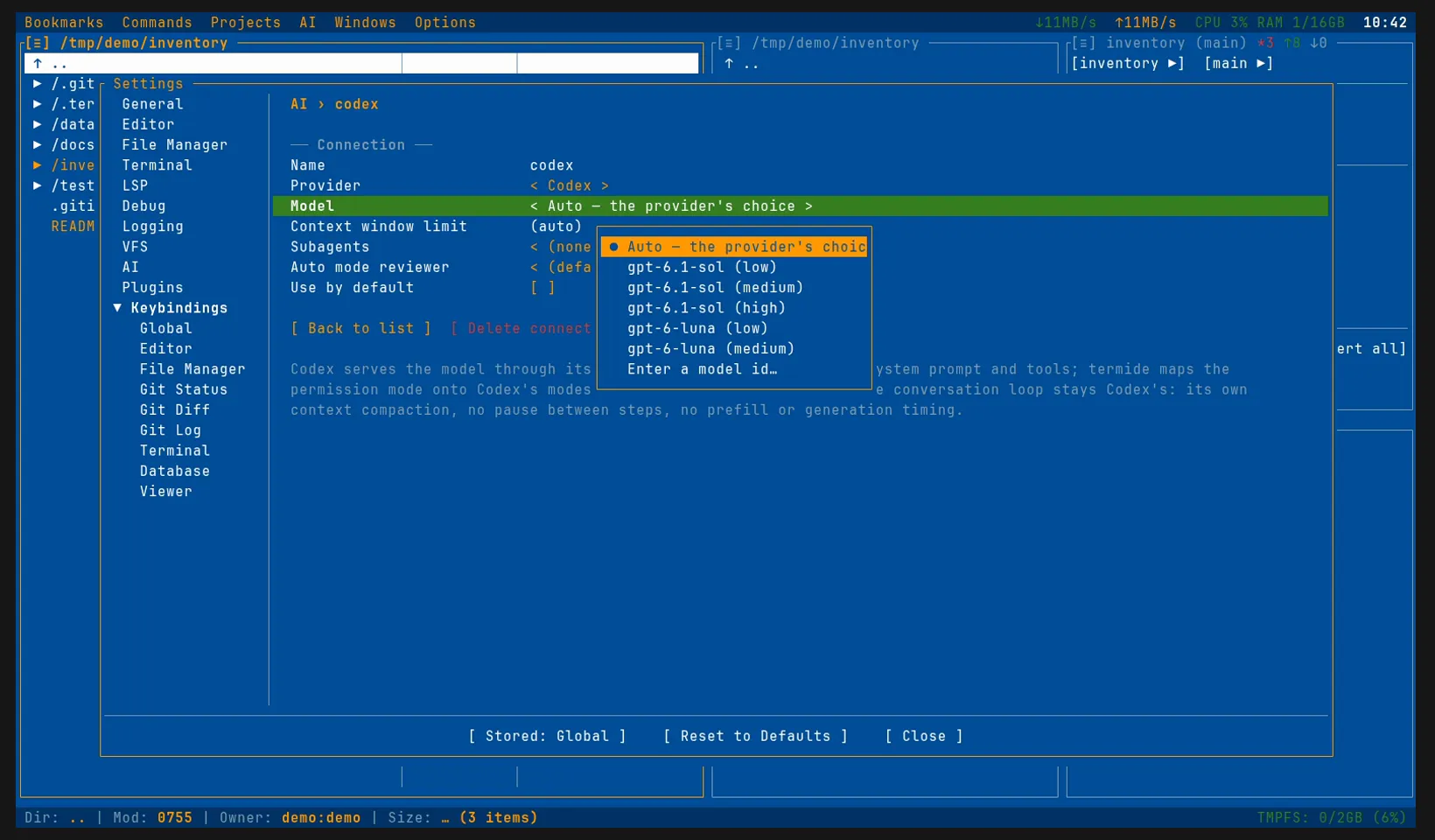
The rest of the page:
- Model: termide starts Codex for a moment and lists the models of your sign-in; a spinner turns in the field meanwhile. Codex lists a model once per reasoning effort. Auto — the provider’s choice leaves the pick to Codex. The model you choose is only the one pre-selected: in the panel you can switch at any time.
- Context window limit: leave it empty to keep the model’s window, or make it smaller. Codex gets it as
model_context_windowthroughCODEX_CONFIG(your ownCODEX_CONFIGis kept) and compacts its conversation at 90% of it, and the panel’sContext:shows no more than it. - Use by default: tick it, and new agent panels start on Codex.
The same in config.toml:
[ai]
connection = "codex"         # the connection new sessions start on

[ai.connections.codex]
provider = "codex"           # nothing else is required
# model = ""                 # empty: Codex's own default
# context_window_limit = 200000
The first request
Open the agent panel with Alt+A. The banner shows the connection and the model; the Model chip in the status bar spins while Codex starts in the background, and a request sent meanwhile waits for it. Then the panel works as with any other connection: answers, reasoning and Codex’s steps appear as blocks — a read, an edit with its file, a command with its command line — an editor that has the file open follows each edit, and the run clock ticks until Codex is done.
The chips switch what Codex offers, at any time, during a run too:
- Model: the models of your sign-in, by the names Codex gives them.
- Reasoning: its reasoning effort.
- Options: the rest of its settings.
Codex’s own / commands join the panel’s / list and go to it as typed; its /compact stands in for termide’s. A message typed while it works joins the turn it is running, as it would in Codex itself.
Codex’s tools, termide’s decisions
Unlike Claude Code, Codex keeps its own system prompt and its own tools: it reads, edits and runs commands as it does in a terminal, and its own configuration — ~/.codex/config.toml, its MCP servers, AGENTS.md — still applies. What termide adds:
- The permission mode. termide puts Codex in the modes that match the panel’s, and decides what Codex asks for approval.
- termide’s MCP servers. Their tools are served to Codex beside its own and checked as Codex’s own calls are. Codex reads the list once, when its session starts, so a server that connects later reaches it in the next session.
- The tools Codex has no counterpart of:
recallto search earlier sessions and git history,skillwith your skills listed in its description,questionandsuggest_command.
The conversation loop stays Codex’s: it compacts its context itself, and a run cannot pause between steps.
Permissions and auto mode
The Permissions chip (or Shift+Tab) sets the mode, and termide maps it onto Codex’s:
| termide | Codex |
|---|---|
ask, configured, auto |
read-only, asking for approval |
plan |
read-only, in its plan collaboration mode |
edit |
workspace write access |
all |
full access |
Whatever Codex asks for approval goes through termide’s checks: your rules, the answers you gave in the session, and the mode. Anything they do not settle comes up as a card above the input: allow once, for the session, always in this project or everywhere, deny, deny and tell the agent why, or stop the run.
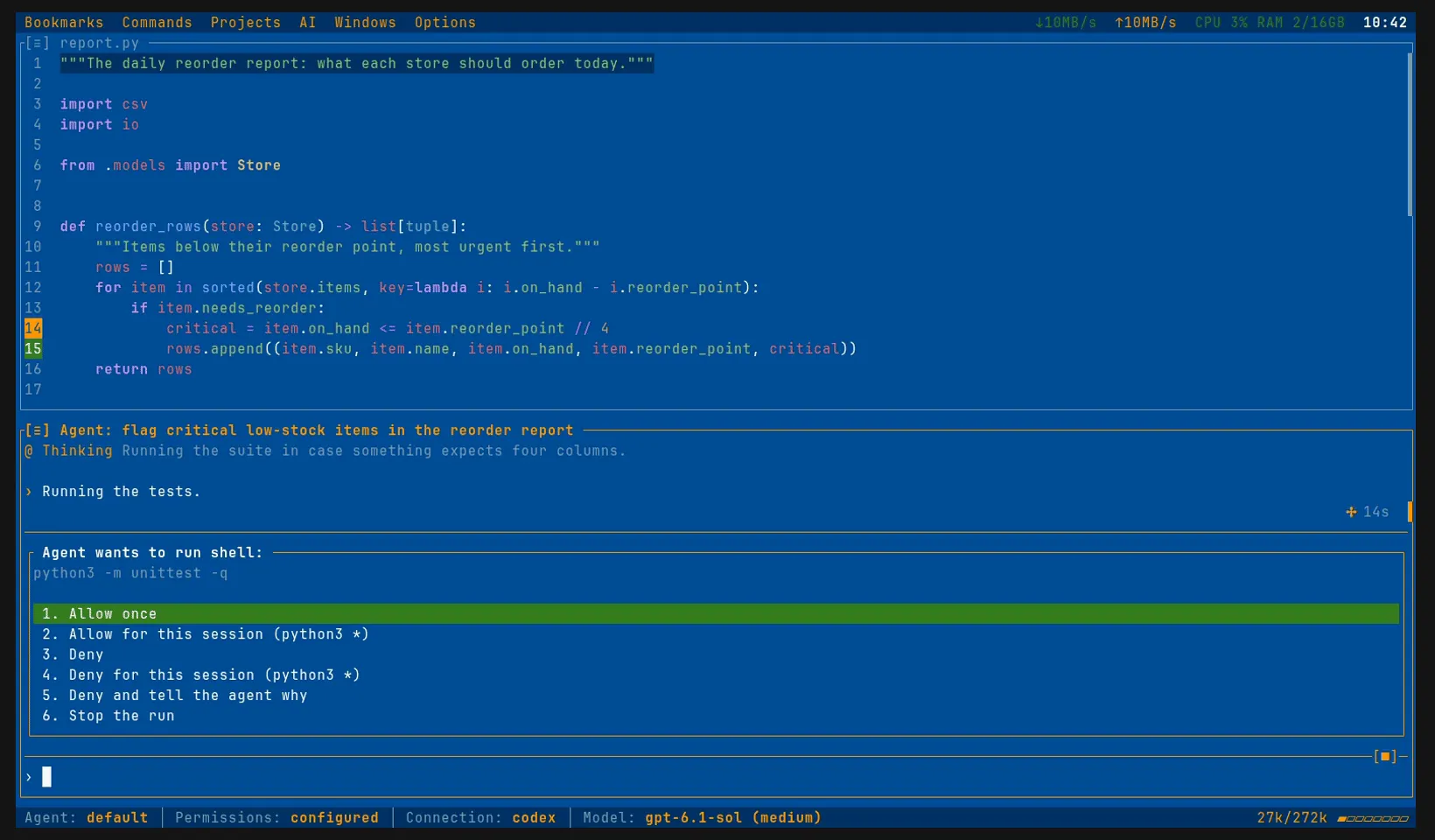
auto is for a run you trust in its direction but do not want to answer card after card. What would put a card up goes to a reviewer, a separate model call that decides whether the step serves what you asked for. On a Codex connection the reviewer runs through your plan, on the cheapest model it offers — the first whose name has luna, or else mini — with no API key; termide keeps the adapter running and asks each review in a short session of its own, without tools and without the agent’s conversation, so the agent never judges itself. A review takes a second or more and counts against the plan’s limits. Another reviewer goes in Auto mode reviewer on the connection’s page or in [ai.auto_reviewer]:
[ai.auto_reviewer]
connection = "codex"    # empty: the session's own
model = "mini"          # a model of it, by id, name or a part of either
Codex’s own auto-review is not used: termide’s reviewer judges every request.
When the limit runs out
A used-up plan window ends the run with a card. Codex’s adapter says when the limit resets only in the error’s text (“try again at 3:00 PM”), and termide reads the time from it:
- Wait until 15:00 and try again,
- Try again now,
- Stop (Esc).
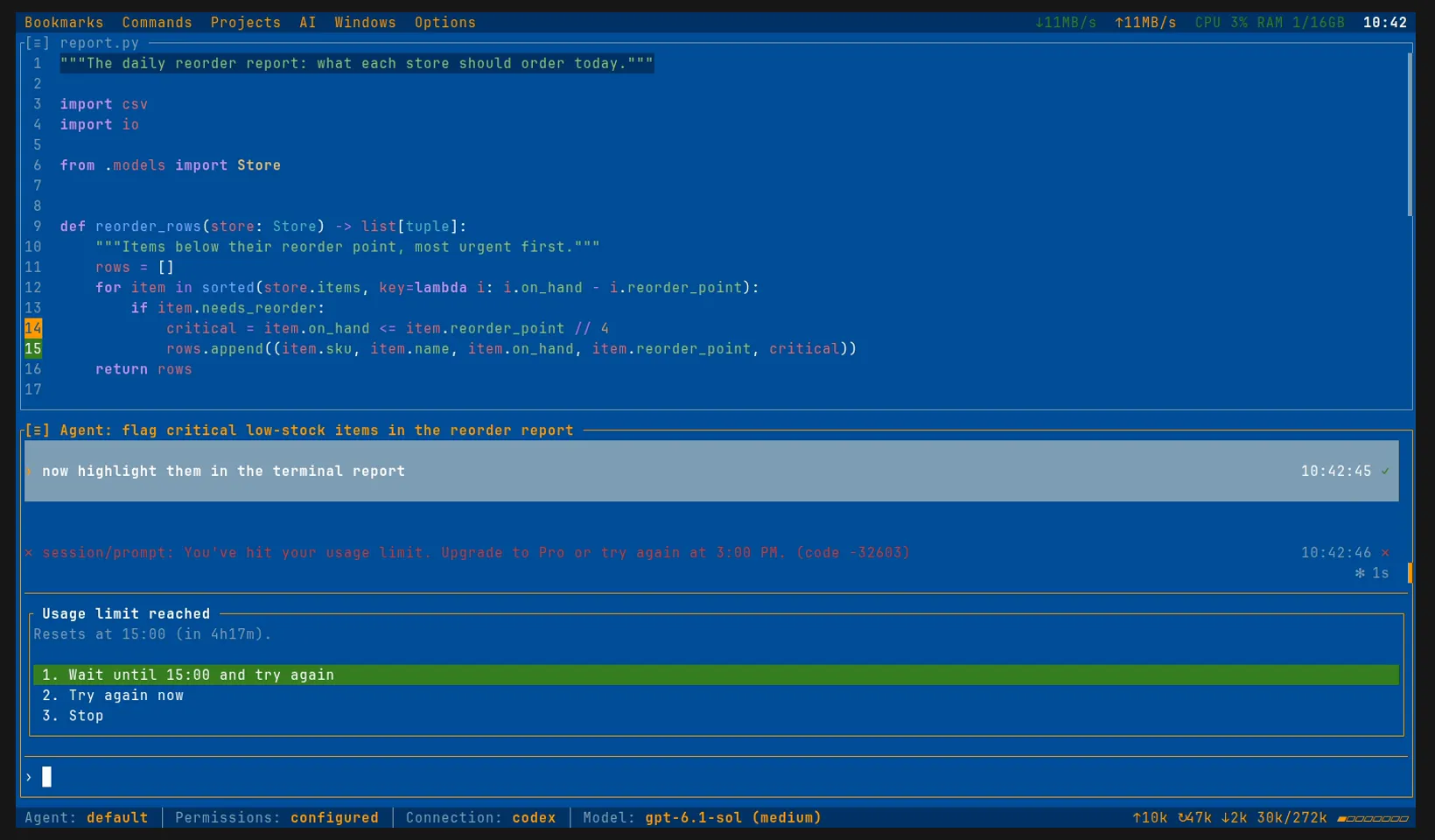
For an unattended /goal or /loop, set On a limit or outage (on_limit under [ai]) to wait, and the run waits for the reset and carries on by itself; ask_else_wait shows the card and waits if nobody answers. Closing termide meanwhile loses nothing: the reopened session brings the card back.
If you do not want to wait, keep a second connection. The status bar’s Connection chip stays clickable while the card is up: move the session to it, then answer Try again now. The conversation carries over, so the other model picks it up where Codex stopped:
[ai.connections.codex]
provider = "codex"

[ai.connections.local]
provider = "openai_compatible"
base_url = "http://localhost:8080/v1"   # llama.cpp, Ollama, omlx…
Delegated tasks
Codex runs no termide delegates: it has its own way of splitting work, and the Subagents field on its page reads (none). A delegate cannot run on Codex either; for that, a session needs a model connection or Claude Code.
Sessions and spending
The session log records Codex’s own session, so a reopened panel continues it, with the whole conversation known to Codex. A session that moved to Codex from another connection starts with a record of the conversation so far. /goal’s judge and /handoff’s brief go to Codex in a fork of its session, closed afterwards, so the conversation is left as it was.
Session info (F3 or /usage) breaks the tokens down by who spent them — the conversation, the auto reviewer and the rest — and by model. Codex counts its reasoning apart, so the Reasoning line shows how much of the output went to thinking.
Good to know
- No sandbox from termide. termide’s permissions are a control, not isolation: what you allow runs with your rights, as far as Codex’s own sandbox mode lets it.
- Claude Code and Gemini CLI connect the same way:
provider = "claude_code"or"gemini_cli". Claude Code in the agent panel and Gemini CLI in the agent panel go through them. - Any OpenAI- or Anthropic-compatible API can be the second connection to move a session to when the limit runs out: a hosted one such as OpenAI, OpenRouter or Anthropic, or a server of your own, with termide’s own agent. llama.cpp and omlx are two examples of the latter.
- The details are in the agent guide.